Unable to Contact
- Tag: “Unable to Contact”
- Move to Re-Engage stage
- SMS: “Hey, tried reaching you…”
- Follow-up email after 24hrs
- Auto-retry call task created
Case study · GHL workflow automation
Built a multi-branch GHL workflow handling 6 appointment outcomes — Unable to Contact, Contacted, No Show, Showed, Sold, and Unqualified. Each branch auto-updates the pipeline stage, tags the contact, sends Thank You email + SMS, requests reviews, and nurtures leads. Zero manual work after setup.
The project
The client was managing a high-volume appointment business and spending hours every day manually updating CRM stages, sending follow-up messages, and tracking lead outcomes. Every appointment had a different result — some prospects didn't answer, some showed up but didn't buy, some no-showed — and each situation required a completely different follow-up response.
With no automation in place, leads were falling through the cracks. No-shows weren't being re-engaged. Sold contacts weren't receiving onboarding. The sales team was wasting time on admin instead of selling. I was brought in to build a system that handles every outcome automatically — the moment an appointment status is updated in GHL, the right sequence fires immediately.
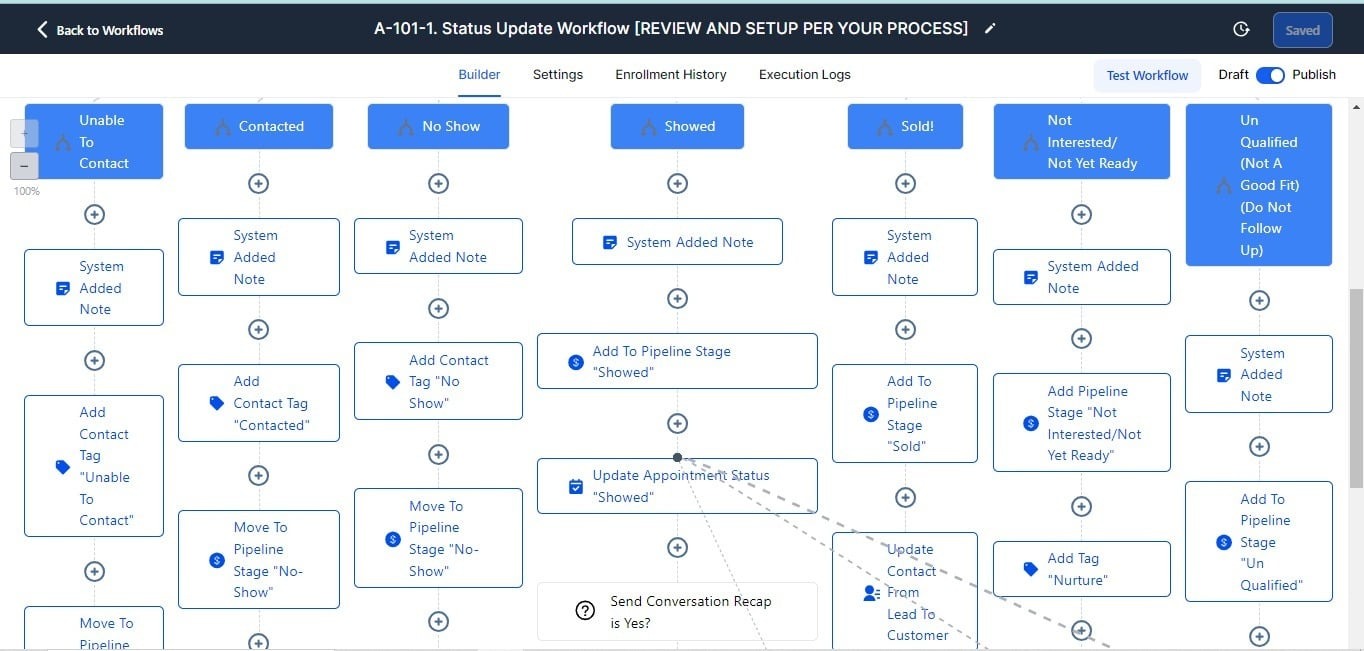
GHL workflow canvas — 6-branch appointment status automation
How it works
Each original branch owns its pipeline move, messages, tags, and timing. That means one status update creates the correct next action without duplicate or conflicting follow-up.
The workflow fires automatically the moment a GHL appointment status is updated — whether by a sales rep, calendar event, or inbound action. No manual trigger needed.
A multi-condition branch reads the appointment outcome and sends the contact down the correct path — one of 6 fully independent branches, each with its own actions and timing.
Each branch immediately moves the contact to the correct CRM pipeline stage. No Show → No Show stage. Sold → Won. Unqualified → Lost. The pipeline always reflects reality in real time.
Every contact gets the appropriate tag so future campaigns, filters, and automations can target them correctly. Sold clients never receive re-engagement emails. No-shows get a dedicated re-booking flow.
Each branch triggers personalised SMS and email messages timed to the outcome — immediate confirmation for booked contacts, warm welcome for sold clients, review requests at the right moment.
If a contact progresses (e.g. from No Show to Sold), the system detects the new status and stops the previous branch's sequence. No duplicate messages. No conflicting flows.
Tools & stack
The original build connects status changes, CRM pipeline movement, segmentation, appointment management, and outcome-specific messages in one working GoHighLevel workflow.
“Samuel built a workflow that completely removed the manual work from our appointment process. Every outcome is handled automatically — the right message goes out, the pipeline updates itself, and our team just focuses on closing. It paid for itself in the first week.”GHL Automation Client · Appointment-Based Business — 6-Branch Pipeline Build
Build your next system
I’ll build you a custom GHL automation that handles every appointment outcome — zero manual work after setup.